Step 1: Open Your DWG File
Open DWG FastView (on your computer or phone).Step 2: Measure an Angle (Key for Slope Calculation)
Since we use angles to find slope, follow these steps to measure the angle of the slanted surface: At the top, click the “Measure” tab. Choose the “Angle” tool (looks like a small angle symbol: ∠). Follow these clicks: Click two points to set the horizontal line (e.g., the bottom edge of a ramp). Click a third point to mark the slanted line (e.g., the top edge of the ramp). The tool will show the angle in degrees (like 30°). Write this number down—it’s what you’ll use to calculate slope.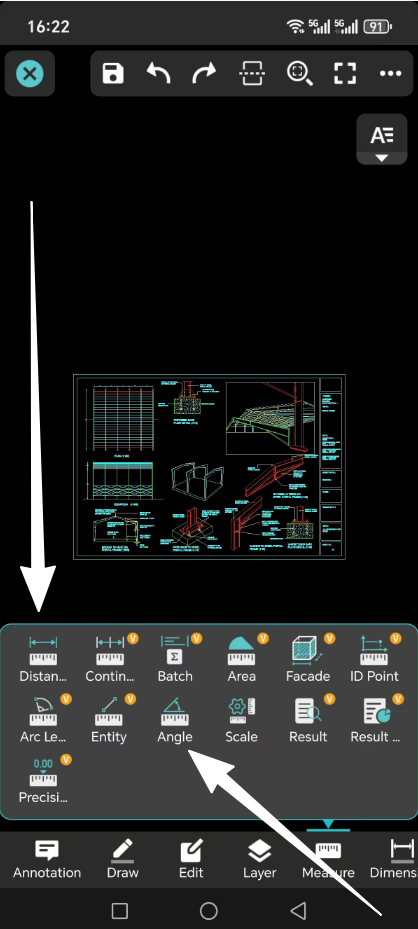
Step 3: Calculate Slope (2 Ways, with Examples)
Use the angle you measured to find slope in two common forms: as a percentage or a ratio.Way 1: Calculate Slope as a Percentage
Formula: Slope percentage = tan(angle) × 100% Example: If your measured angle is 30°: Use a calculator to find “tan(30°)” (most phones or computers have a “tan” button). tan(30°) ≈ 0.577 Multiply by 100% to get the slope percentage: 0.577 × 100% = 57.7% So the slope is about 57.7%Way 2: Calculate Slope as a Ratio
Formula: Slope ratio = 1 : (1 / tan(angle)) Example: Using the same 30° angle: First, find “tan(30°) ≈ 0.577” (just like before). Calculate “1 / tan(angle)”: 1 / 0.577 ≈ 1.732 Write it as a ratio: 1 : 1.732 So the slope ratio is about 1 : 1.732Summary
DWG FastView’s free angle measurement tool makes it easy to find slope. Remember: it doesn’t give slope directly—you just measure an angle, then use the simple formulas above to calculate slope percentage or ratio. This works for roofs, roads, ramps, and any other slanted surface in your DWG files. It is free to measure distance and angle and then you can calculate the slope. Although DWG FastView provides free trial, but if you want to unlock all featues & remove all ads, please click the button below to upgrade your DWG FastView account on mobile phone. If you want to upgrade on PC, click here. Wherever you upgrade your account on mobile app or on web, the VIP account is the same and can be used across devices, Mobile, Windows and web browsers.