Click the dropdown menu of measure angle, you can see two options:
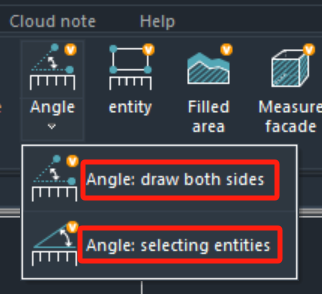 For the 2nd one, Angle: select entities, it is easy to understand. When you want to measure an angle, just select the first line and then the second line, the angle will be calculated and marked.
But what does the first mean? Angle: draw both sides. It will draw two lines automatically and calculate the angle:
For the 2nd one, Angle: select entities, it is easy to understand. When you want to measure an angle, just select the first line and then the second line, the angle will be calculated and marked.
But what does the first mean? Angle: draw both sides. It will draw two lines automatically and calculate the angle:
 This feature is now only on Windows version, not yet on mobile version. If you are already a premium member on mobile, you can login on Windows to use this feature. Sure, if you buy on Windows, you can also unlock all features on mobile version.